

202 checks on every page
PixyScan checks every page against 202 search, AI and technical checks and gives your site a health score out of 100.
At a glance
What it does and who gets it
- What it does
- PixyScan checks every page against 202 search, AI and technical checks and gives your site a health score out of 100.
- Why it helps
- You get one list of problems, biggest first. Each one shows the pages it affects and a guide to fixing it.
- Included in
- Every tier. Free runs 181 of the 202 checks. Hobby and above run all 202.
What you get
- 01
202 checks in 10 categories
The checks cover crawling, indexing, links, page tags, content, structured data, images, social tags, languages, and speed and security. 126 are scored problems. The other 24 are suggestions that never cost points.
- 02
A health score out of 100
Each failing check costs points. Serious problems cost more, and so do problems on more pages. Problems that stop pages being found or indexed count the most.
- 03
The pages behind every problem
Each issue lists the exact pages where it was found. A mistake in one template shows as one issue across many pages, not hundreds of separate issues.
- 04
A fix guide beside every issue
Each check has a written guide: what the problem is, why it matters and how to fix it. The guide opens next to the issue in the app.
How to use it
4 steps, in the order you do them.
- 1
Add your site
Enter your site's address. PixyScan reads your robots.txt and sitemaps, then follows the links from your home page.
- 2
Run a scan
PixyScan runs up to 202 checks on each page it finds. Each page uses one URL credit from your monthly allowance.
- 3
Read your score
You get a health score out of 100. Each failing check costs points, based on how serious it is and how many pages it affects.
- 4
Fix from the top
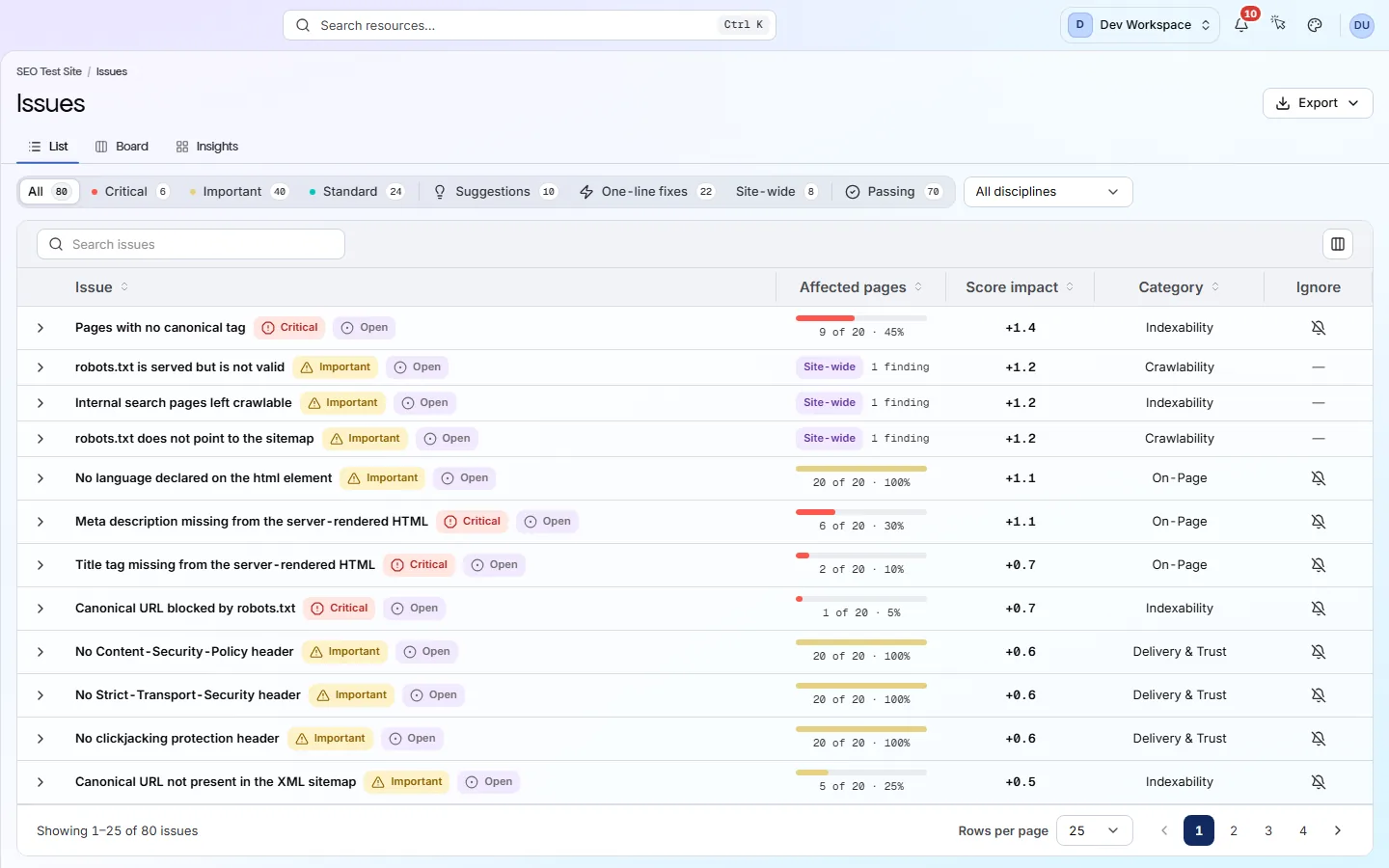
The Issues screen puts the problems that cost the most points first. Open one to see its pages and fix guide, fix it, then scan again.
Which tiers include it
Every tier. Free runs 181 of the 202 checks. Hobby and above run all 202.
- Free runs 181 checks. The other 21 (broken and redirecting outside links, broken images and 18 page-speed checks) start on Hobby.
- Core Web Vitals (Google's measures of page speed and stability) and Lighthouse page-speed audits start on Hobby and need your own Google API key.
- JavaScript rendering, where a real browser loads each page, starts on Pro.
- Most pages in one scan: 500 on Free, 5,000 on Hobby, 10,000 on Basic and 15,000 on Pro.
What it doesn’t do
- It never changes your site. You or your developer make each fix.
- No AI writes content or fixes. Every fix guide is written by people.
- No keyword research, rank tracking or backlink data.
- Every area runs on every scan. You can limit a single check to certain URLs, or exclude URLs from it.
Why use it
When it helps
Everyday moments where it saves you time or catches a problem early.
A first full check-up
Your first scan lists every problem, the pages it is on and how to fix it. Later scans are compared with this one.
Deciding what to fix first
Work down the Issues screen from the top. A problem on every page can be worth more than a critical one on a single page.
A check that does not fit part of your site
In Settings → Ignored issues, stop a check being reported on certain URLs. Ignored problems still count in the score, because hiding is not fixing.
Where to find it in the app
All eleven screensUnderstand
Issues
The Issues screen lists every check your site fails. The fix worth the most points is at the top. Open any row to see the pages affected and a guide to fixing it.
Understand
Site overview
The Overview is the first screen you see for a site. It shows your health score, what changed since the last scan and where the problems are. Click any number to see the detail behind it.
Questions
Common questions
Short answers about tiers, setup and limits.
What do the checks cover?
They are grouped into ten areas: On-Page (35), Structured Data (22), Link Integrity (26), Delivery & Trust (37), Crawlability (18), Social & Sharing (13), Content & Answers (12), Indexability (24), Media (8), International (7). Every area runs on every scan.
What is the difference between an issue and a suggestion?
126 checks are issues. They are rated critical, important or standard, and they cost points. The other 24 are suggestions: useful advice that costs no points.
Do I need to install anything?
No. PixyScan reads your site from the outside, like a search engine does. There is no plugin or code to add.
Does it check page speed?
Yes, from Hobby up. After each scan, PixyScan tests a sample of pages with Google PageSpeed Insights, using your own Google API key.
Does it work with JavaScript sites?
Yes, from Pro up. Choose JavaScript rendering in Settings → Crawl. Scans take about 7.6 times longer, so use it only if your pages build their content in the browser.
Does it fix problems for me?
No. PixyScan never changes your site. Each check has a written guide, and you or your developer make the change.
Other features
All featuresPages, links and images
Browse every page, link and image the scan found, and open any page for its full report.
ReadCI/CD and MCP
Run a PixyScan scan from your build pipeline and stop the release if your score drops.
ReadReports and exports
Turn any scan into a report or data file: 61 kinds, in PDF, CSV, XLSX, JSON or Markdown.
ReadSee what is wrong with your site
Add your site and get your score, your to-do list and a fix guide for every problem. Free for one site and 500 pages a month. No card, no time limit.
No card needed · Nothing to install · Cancel any time