

Know the day a release breaks something
Scan on a schedule or from your CI pipeline. PixyScan compares each scan with the last one and alerts you by email, Slack or webhook when things get worse.
Does this sound familiar?
If this sounds like your week, read on. Below is how PixyScan helps.
- Traffic dropped in April, and it took weeks to trace it to a February release.
- Your pipeline runs tests, but nothing checks that pages can still be found.
- When a problem shows up, nobody can say which release caused it.
How PixyScan helps
How PixyScan helps
Each card is a real screen in the app: what you see there and what you do with it.
- 01
See what changed
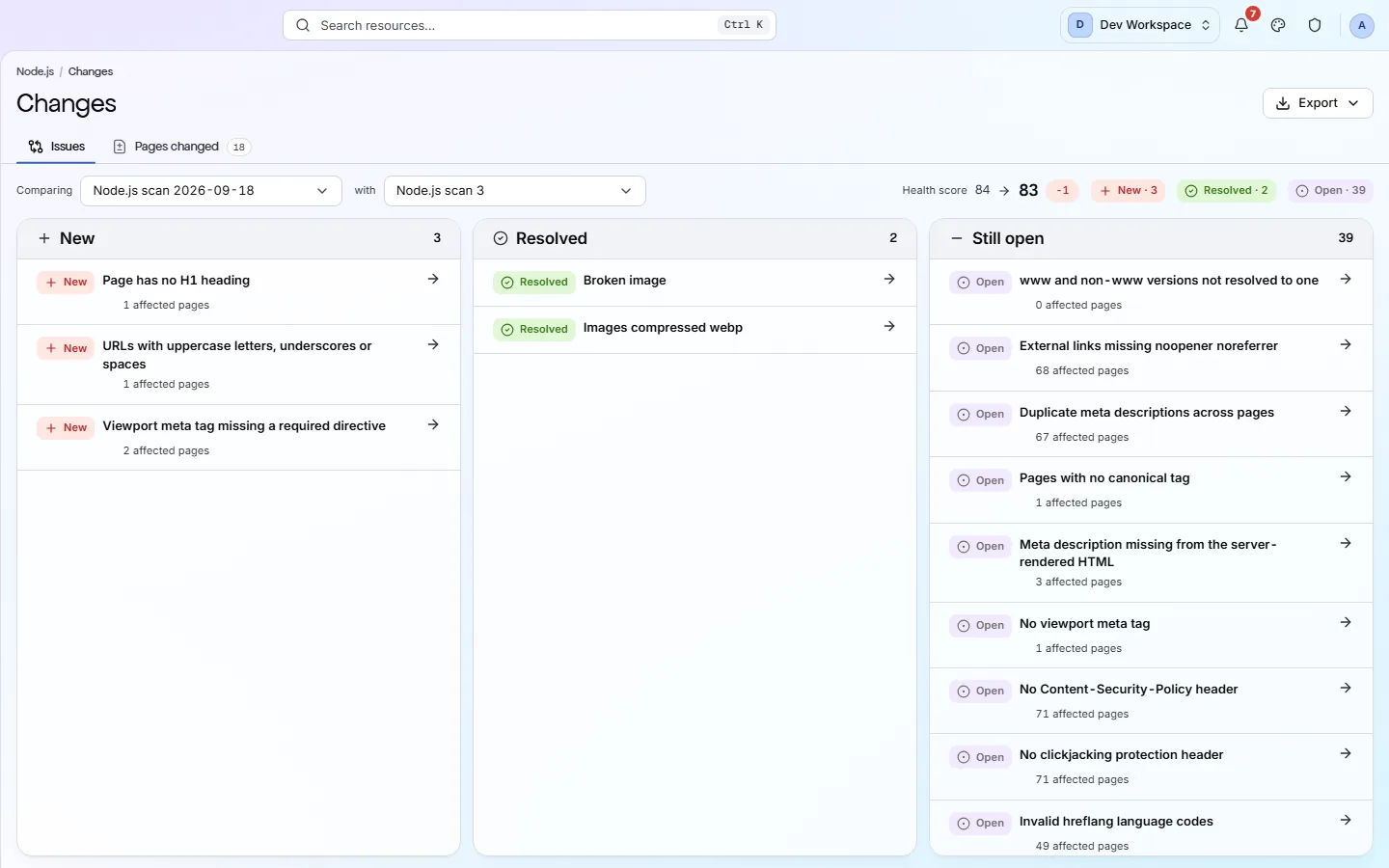
The Changes screen sorts problems into New, Resolved and Still open since the last scan of the same branch. Regressed marks a problem that now affects more pages.
- 02
Get alerted
Alerts go by email, to Slack or to any webhook when a scan finishes or fails, the score drops or a new critical problem appears. With Search Console connected, a sharp drop in Google clicks after a deploy alerts you too.
- 03
Stop bad releases in CI
From Basic up, add npx pixyscan-sdk run to your pipeline. It fails the build when the score drops too low, before the release goes live.
Getting started
Get started in 3 steps
- Step 1
Run a first scan
Scan your live site once. Every later scan is compared with this one.
- Step 2
Set a schedule and alerts
Choose daily or weekly scans in Settings → Schedule. In Settings → Alerts, send alerts by email, to Slack or to a webhook.
- Step 3
Add a CI check
From Basic up, add npx pixyscan-sdk run to your pipeline. It catches problems before a release goes live.
Worth knowing
- Scans run daily, weekly or monthly in your timezone. Missed scans are made up with one scan.
- Reopen any past scan to see exactly when a problem first appeared.
- Each scan records its branch, so preview runs never mix with your live site's history.
- With Search Console connected, deploys from CI/CD are marked on the clicks trend with their commit and release, so you can see what search traffic did after each one.
What it doesn’t do
- Alerts cover a fixed set of events, not single checks. The CI fail-on list can stop a build on one check.
- No GitHub app. Nothing comments on pull requests.
- It does not say which commit caused a problem. It names the first scan that found it, and that scan's commit if it ran from CI.
Start with Hobby or Basic
Hobby ($19 a month) is the first tier with scheduled scans and scan comparison, enough to catch a bad release within a day. Basic ($39 a month) adds the CI/CD check to stop it before it ships, with 5 sites and 10,000 pages per scan. With Search Console, Basic also marks deploys on your clicks trend and alerts you when clicks drop after one.
FAQ
Questions you might have
How soon after a release will I know?
As soon as the next scan finishes. That is your next scheduled scan, or straight away if your pipeline scans every deploy.
Can it tell me which commit caused the problem?
Not on its own. It tells you which scan first found it, with the branch, the time and the URLs. A scan run from your pipeline also records the commit it ran for, which narrows the search, but that commit is not necessarily the cause.
Will I get an email?
Yes. Alerts go by email, to Slack or to a webhook when a scan finishes or fails, the score drops or a new critical problem appears. With Search Console connected, from Basic up, a sharp drop in Google clicks after a deploy alerts you too. Each email has a one-click unsubscribe link.
Can I get an alert for one specific check?
No. Alerts cover a fixed set of events. To stop a build on one check, add it to the CI fail-on list (Basic and above).
Screens and features to explore
See what is wrong with your site
Add your site and get your score, your to-do list and a fix guide for every problem. Free for one site and 500 pages a month. No card, no time limit.
No card needed · Nothing to install · Cancel any time