

See every page, link and image
Browse every page, link and image the scan found, and open any page for its full report.
At a glance
What it does and who gets it
- What it does
- Browse every page, link and image the scan found, and open any page for its full report.
- Why it helps
- You can find a broken or forgotten page fast, and see exactly what search engines see on it.
- Included in
- Every tier. Exports and checking outside links and images start on Hobby.
What you get
- 01
A full report for any page
Open a page to see its status, title, description, headings, links, images, structured data and security headers. It also previews how the page may look in search results.
- 02
The shape of your site
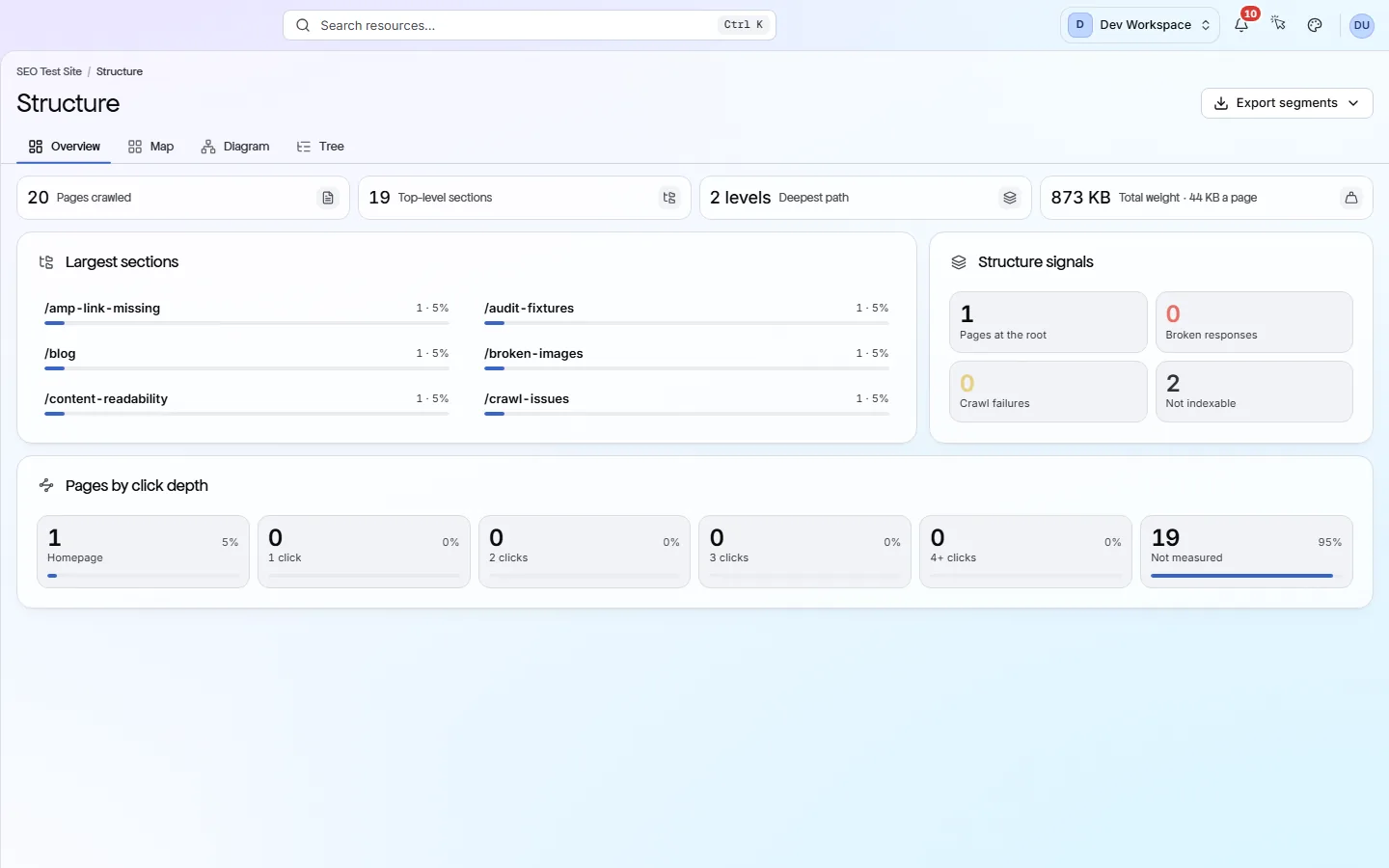
The Structure screen groups pages into sections and shows how many clicks each is from your homepage. Very deep or oddly large sections are worth a look.
- 03
robots.txt and sitemaps together
The Crawlability screen shows your robots.txt rules (what bots may visit) next to your sitemaps. You can spot where they disagree, such as a sitemap page that robots.txt blocks.
- 04
Links and images, grouped
The Links screen lists broken and insecure links and every site you link to. The Images screen lists every image with its alt text, format and size.
How to use it
4 steps, in the order you do them.
- 1
Run a scan
One scan records each page's status code, tags, headings, links, images, structured data and headers. Nothing extra has to run.
- 2
Pick a screen
Pages lists every URL. Structure shows how your site is organised. Crawlability shows robots.txt and sitemaps. Links and Images show those.
- 3
Open any page
Click a row to open that page's full report. It shows everything the scan found on the page and every problem it has.
- 4
Search and export
Every list has search and filters. From Hobby up, you can export any list as CSV, XLSX or JSON.
Which tiers include it
Every tier. Exports and checking outside links and images start on Hobby.
- Browsing, search and filters work on every tier.
- Exporting any list as CSV, XLSX or JSON starts on Hobby.
- Checking that outside links and images still load starts on Hobby: 50,000 checks a month, 250,000 on Basic and 1,000,000 on Pro.
- Pages built with JavaScript need JavaScript rendering, from Pro up.
- Google clicks and impressions next to each page start on Basic, with Search Console connected.
What it doesn’t do
- No rank tracking, keyword research or backlink data.
- It lists links on your own pages, not links on other sites that point to you.
- No log-file analysis (reading your server's visit records).
Why use it
When it helps
Everyday moments where it saves you time or catches a problem early.
Before moving to a new site
Export a list of every URL and its status code before you move. Check it against the new site so no page gets lost.
Checking a reported problem
Someone says a page has the wrong tags? Open its report to see exactly what the last scan found.
Finding forgotten pages
The Structure screen shows each section of your site and its size. Old test pages and leftover folders are easy to spot.
Where to find it in the app
All eleven screensExplore
Pages
The Pages screen lists every URL the scan found, as a table or a folder tree. Filter it to find broken or hidden pages. Open any page for a full report on it.
Explore
Structure
The Structure screen draws your site from the pages the scan found, grouped into folders such as /blog/. It shows your biggest sections, how deep pages sit, and folders you may have published by mistake.
Explore
Crawlability
Crawlability is whether search engines and AI bots can find and reach your pages. This screen shows your robots.txt rules, your sitemaps, your redirects and anything that keeps bots out.
Explore
Links
The Links screen shows every link the scan found: links to other sites and links between your own pages. Use it to find broken links, the pages they sit on, and pages that get too few links.
Explore
Images
The Images screen puts every image the scan found into one gallery. It shows which are missing alt text, broken, too heavy or in an older format, and which pages use each one.
Questions
Common questions
Short answers about tiers, setup and limits.
Is this a separate scan?
No. These screens read the same scan as the audit, so browsing them does not start anything or use credits.
Why does this matter for search and AI tools?
A page that returns an error, sits many clicks deep or is blocked by robots.txt is harder for them to reach. Seeing everything in one place helps you find those pages.
Does it see pages built with JavaScript?
Yes, from Pro up, when you choose JavaScript rendering in Settings → Crawl. Otherwise it reads the HTML your server sends, which is faster.
How many pages can one scan cover?
Up to 500 on Free, 5,000 on Hobby, 10,000 on Basic and 15,000 on Pro. You can include or exclude parts of your site in Settings → Crawl.
Can I see which pages get search traffic?
Yes, from Basic up, once you connect Google Search Console. The Pages table and each issue's affected pages show Google clicks and impressions over the last 28 days, and you can sort by them to fix busy pages first.
Does it show links from other sites to mine?
No. It only lists links on your own pages. Backlinks need a different kind of tool.
Other features
All featuresCI/CD and MCP
Run a PixyScan scan from your build pipeline and stop the release if your score drops.
ReadReports and exports
Turn any scan into a report or data file: 61 kinds, in PDF, CSV, XLSX, JSON or Markdown.
ReadWorkspaces, sites and roles
Put your sites and your team in one workspace, and give each person only the sites they need.
ReadSee what is wrong with your site
Add your site and get your score, your to-do list and a fix guide for every problem. Free for one site and 500 pages a month. No card, no time limit.
No card needed · Nothing to install · Cancel any time