

Reports you can send to anyone
Turn any scan into a report or data file: 61 kinds, in PDF, CSV, XLSX, JSON or Markdown.
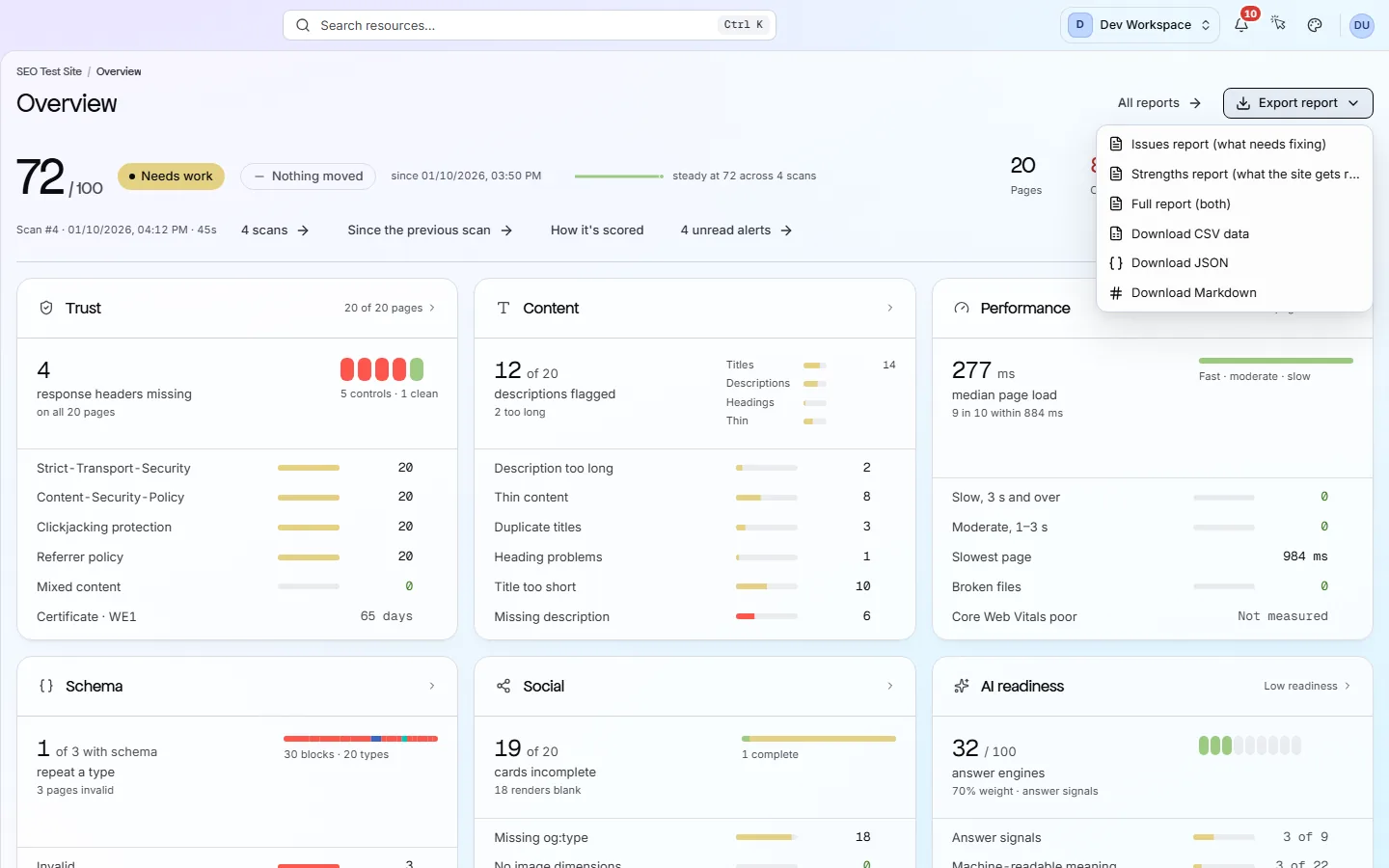
At a glance
What it does and who gets it
- What it does
- Turn any scan into a report or data file: 61 kinds, in PDF, CSV, XLSX, JSON or Markdown.
- Why it helps
- You can share results with a client, a manager or a developer, even if they have no PixyScan account.
- Included in
- Every tier. Fix steps and data exports start on Hobby. Your own branding starts on Pro.
What you get
- 01
Six ready-made reports
Issues, Strengths, Full, Compare (this scan against an earlier one), Overview and AI readiness. Each explains itself, so the reader does not need a PixyScan account.
- 02
Five formats
PDF, CSV, XLSX, JSON or Markdown. PDF suits clients and managers. Spreadsheets and JSON suit developers.
- 03
About 55 data exports
Beyond the six reports, export data such as every page, link, image and issue, and score trends. These come as CSV, XLSX or JSON.
- 04
Your own branding
From Pro up, add your logo, colours, a cover and a footer. Co-branded mode shows your brand beside PixyScan's. Agency mode removes the PixyScan mark entirely.
How to use it
4 steps, in the order you do them.
- 1
Pick a scan
Open the latest scan, or any past scan from Scan history. The report always shows the scan you picked.
- 2
Pick a report or dataset
Choose one of the six reports: Issues, Strengths, Full, Compare, Overview or AI readiness. Or export a dataset, such as every page or every broken link.
- 3
Pick a format
Reports download as PDF, CSV, XLSX, JSON or Markdown. Datasets download as CSV, XLSX or JSON.
- 4
Add your brand (Pro and above)
On the workspace Reports screen, add your logo, colours, cover and footer. Agency mode removes the PixyScan mark completely.
Which tiers include it
Every tier. Fix steps and data exports start on Hobby. Your own branding starts on Pro.
- The six reports download on every tier. On Free they list the problems without fix steps.
- The 55 data exports (CSV, XLSX or JSON) start on Hobby.
- Your own logo and colours on reports start on Pro.
- Saved brand profiles are kept if you move to a lower tier.
What it doesn’t do
- Reports are not emailed on a schedule. You download them and send them yourself.
- No public REST API yet. From Basic up, the CI command and the MCP server can read results outside the app.
Why use it
When it helps
Everyday moments where it saves you time or catches a problem early.
Monthly client reports
Send the Full report with the Compare report against last month. The client sees what was found and what was fixed.
Handing work to a developer
Export the critical problems as a spreadsheet and attach it to a ticket. Each row has the URL and the problem.
Before and after a redesign
Download a report from the last scan before the redesign and the first scan after. Compare them to see what changed.
Where to find it in the app
All eleven screensMonitor
Scan history
Scan history lists every scan of your site, newest first, with its status and score. Open a past scan and every screen shows your site as it was that day.
Understand
Issues
The Issues screen lists every check your site fails. The fix worth the most points is at the top. Open any row to see the pages affected and a guide to fixing it.
Questions
Common questions
Short answers about tiers, setup and limits.
Which tiers include reports?
The six reports download on every tier. On Free they leave out the fix steps. Data exports start on Hobby, and branded reports start on Pro.
Does the reader need a PixyScan account?
No. Each report explains itself, so you can send it to anyone.
Can reports show our brand instead of PixyScan?
Yes, from Pro up. Co-branded mode shows your brand beside PixyScan's. Agency mode removes the PixyScan mark completely.
Can reports be emailed automatically?
No. You download them from the app when you need them and send them yourself.
Can I download a report for an old scan?
Yes. A past scan's report shows that scan exactly as it was, so you can make a before-and-after pair.
Other features
All featuresWorkspaces, sites and roles
Put your sites and your team in one workspace, and give each person only the sites they need.
ReadScheduled monitoring
PixyScan scans your site daily, weekly or monthly on its own, and tells you what changed.
ReadThe site audit
PixyScan checks every page against 202 search, AI and technical checks and gives your site a health score out of 100.
ReadSee what is wrong with your site
Add your site and get your score, your to-do list and a fix guide for every problem. Free for one site and 500 pages a month. No card, no time limit.
No card needed · Nothing to install · Cancel any time