

Check your marketing site on every release
Your marketing site, docs and blog change every week. PixyScan can scan every deploy from your pipeline, keep previews apart from your live site and show what each release changed.
Does this sound familiar?
If this sounds like your week, read on. Below is how PixyScan helps.
- The marketing site ships several times a week, and nobody checks how search engines see it.
- A refactor removed the main heading from every pricing page, unnoticed for a month.
- Docs, blog and marketing belong to different teams, and nobody watches all three.
How PixyScan helps
How PixyScan helps
Each card is a real screen in the app: what you see there and what you do with it.
- 01
A check in your pipeline
Add npx pixyscan-sdk run to your deploy pipeline. It fails when the score drops below your threshold or a check you named fails, so the release stops before it goes live.
- 02
One site per property
Add your marketing site, docs and blog as separate sites. Each gets its own score, schedule, alerts and history, so each team owns its results.
- 03
What each release changed
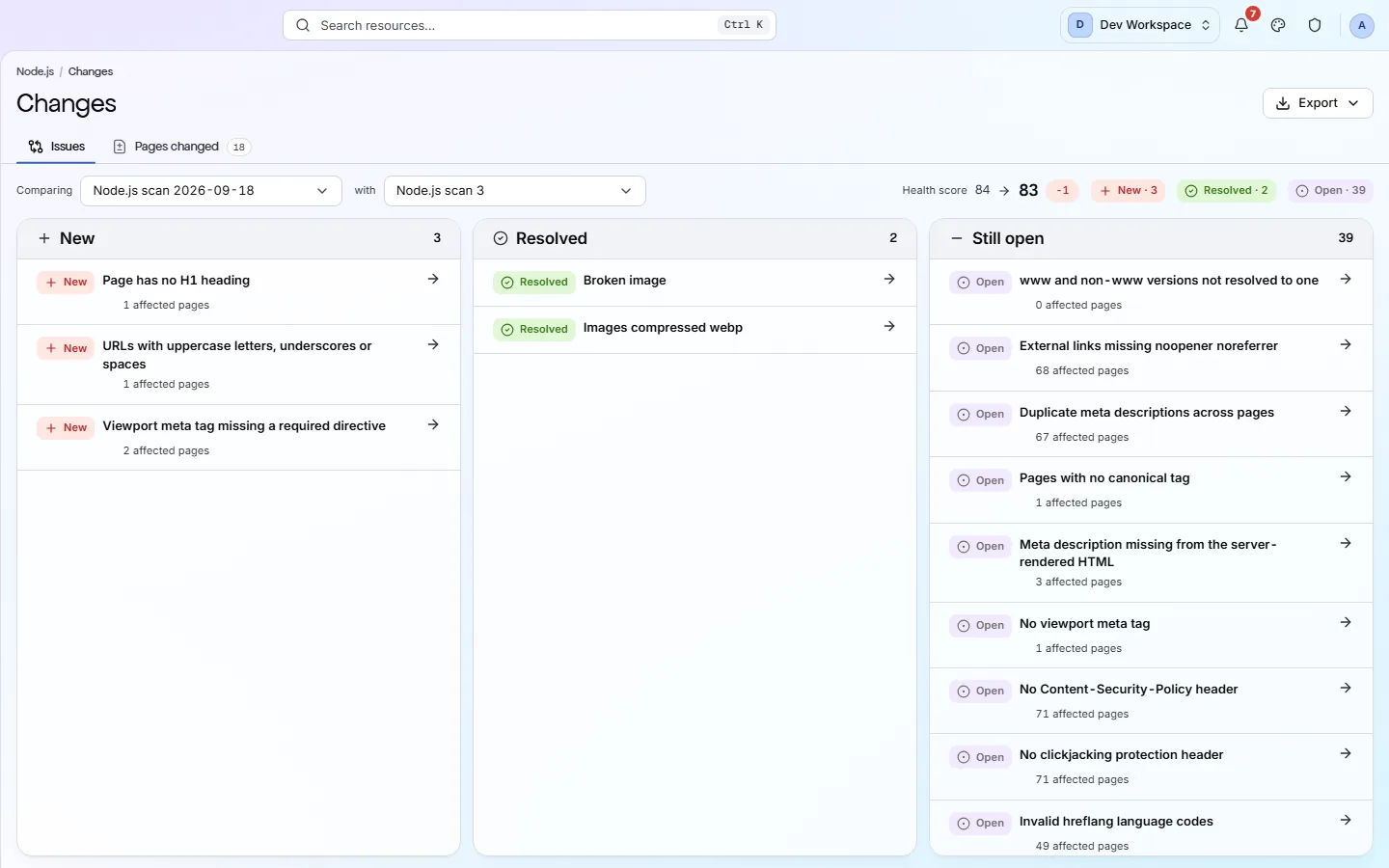
The Changes screen lists problems as New, Resolved or Still open since the last scan of the same branch. Its Pages changed tab shows pages added, removed or changed.
Getting started
Get started in 3 steps
- Step 1
Add each property as a site
Add your marketing site, docs and blog as separate sites, so each has its own score, schedule and history.
- Step 2
Add the CI step
Create the site's client secret in Settings → SDK & CI/CD (Basic and above). Then add npx pixyscan-sdk run to your deploy pipeline.
- Step 3
Check Changes after each release
After a release, open the Changes screen. New shows what the release broke. Resolved shows what it fixed.
Worth knowing
- The AI readiness screen shows whether AI tools can reach and read your pages.
- From Hobby up, Core Web Vitals (Google's speed measures) and Lighthouse page-speed audits are tested on a sample of pages, with your own Google API key.
- From Pro up, a real browser loads pages that build their content with JavaScript.
- With Search Console connected, each deploy is marked on the clicks trend with its commit, and a sharp drop in Google clicks after a deploy sends an alert.
What it doesn’t do
- No GitHub app. Nothing comments on pull requests; your pipeline acts on the pass or fail.
- No Google Analytics connection. Search Console clicks, from Basic, can sort your pages and issues, but the score and the default order ignore them.
Start with Basic
Basic ($39 a month) is the first tier with the CI/CD check, and its 5 sites cover marketing, docs and blog. Choose Pro ($129 a month) if your site renders with JavaScript, or you need more than 5 sites or more than 2 scans at once.
FAQ
Questions you might have
Does it work with static site generators?
Yes. PixyScan reads the HTML your site serves, so static sites work with the standard scan. You only need JavaScript rendering (Pro and above) if content is built in the browser.
Can subdomains and paths be separate sites?
Yes. docs.example.com and example.com/blog can each be their own site, with their own settings, schedule and alerts.
Does it measure Core Web Vitals?
Yes, from Hobby up, with your own Google API key. It reports LCP, INP, CLS, TTFB and FCP for a sample of pages, along with Lighthouse findings such as unused code and oversized images.
Can it scan a preview deploy behind a password?
Yes, if it uses HTTP Basic Auth (the browser's own password prompt) or custom headers. A site behind a login form cannot be scanned.
See what is wrong with your site
Add your site and get your score, your to-do list and a fix guide for every problem. Free for one site and 500 pages a month. No card, no time limit.
No card needed · Nothing to install · Cancel any time