

Make your site easy for AI tools to read
See whether AI crawlers may reach your pages, and how easy your content is for them to read and quote. No tool can promise an AI will cite you, and PixyScan does not claim to.
Does this sound familiar?
If this sounds like your week, read on. Below is how PixyScan helps.
- Visitors now come from ChatGPT, and you don't know what it can see on your site.
- Someone added an llms.txt file, and nobody knows if it still works.
- Your robots.txt has AI bot rules nobody remembers adding.
How PixyScan helps
How PixyScan helps
Each card is a real screen in the app: what you see there and what you do with it.
- 01
AI crawler access
PixyScan reads your robots.txt and shows whether each of 18 AI crawlers from 11 companies is allowed or blocked. Each is labelled: answering questions, reading shared links or training models.
- 02
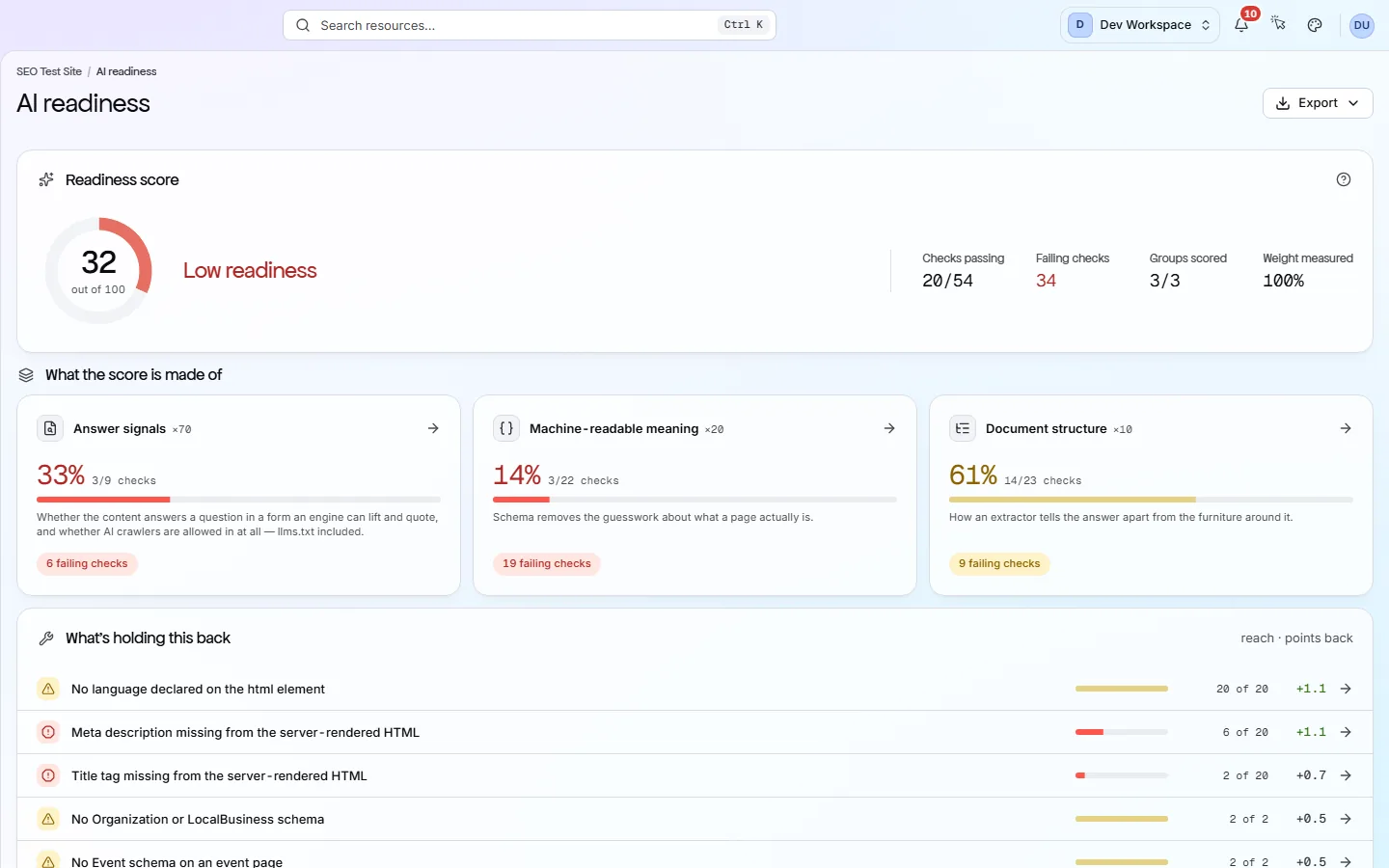
An AI readiness score
One score from three weighted areas: answer signals (70), machine-readable meaning (20) and document structure (10). Each area lists the checks behind it.
- 03
Structured data that works
Structured data is code that labels your content for machines, such as who wrote an article. 22 checks validate it across 31 schema.org types.
Getting started
Get started in 3 steps
- Step 1
Check AI crawler access
Open the Crawlability screen to see which AI crawlers your robots.txt allows or blocks. Decide which you want, then update the file.
- Step 2
Improve your content
Open the AI readiness screen and work through the failing checks in each area, such as broken structured data or unclear headings.
- Step 3
Track it over time
From Hobby up, set a schedule. Each scan updates your AI readiness score, so you see it rise as fixes go live.
Worth knowing
- llms.txt and llms-full.txt (files that describe your site for AI tools) are checked for format and broken links.
- Each page gets a readability score, because plain writing is easier to quote.
- Search your robots.txt rules by bot name on the Crawlability screen.
What it doesn’t do
- It does not predict whether an AI tool will cite you. It checks what you control.
- It does not track whether or where your site appears in AI answers.
Start with Free, then Hobby
AI readiness and the AI crawler checks are on every tier, Free included, so you can check your site today. Hobby ($19 a month) adds scheduled scans and scan comparison, so you can watch the score rise as you fix things.
FAQ
Questions you might have
Will this get us cited by ChatGPT or Perplexity?
No tool can promise that, and PixyScan does not try. It checks what you control: whether AI crawlers can reach your pages, and whether your content is easy to read.
Should we block AI training crawlers?
That is your choice. Blocking training crawlers does not block the ones that answer questions. PixyScan shows which group each crawler belongs to.
Do we need an llms.txt file?
No, it is optional, and few AI tools read it yet. If you publish one, PixyScan checks its format and its links.
Does it show where we appear in AI answers?
No. It does not track AI answers. It checks the signals on your own site.
Screens and features to explore
See what is wrong with your site
Add your site and get your score, your to-do list and a fix guide for every problem. Free for one site and 500 pages a month. No card, no time limit.
No card needed · Nothing to install · Cancel any time