

Catch problems before you release
Run a PixyScan scan from your build pipeline and stop the release if your score drops.
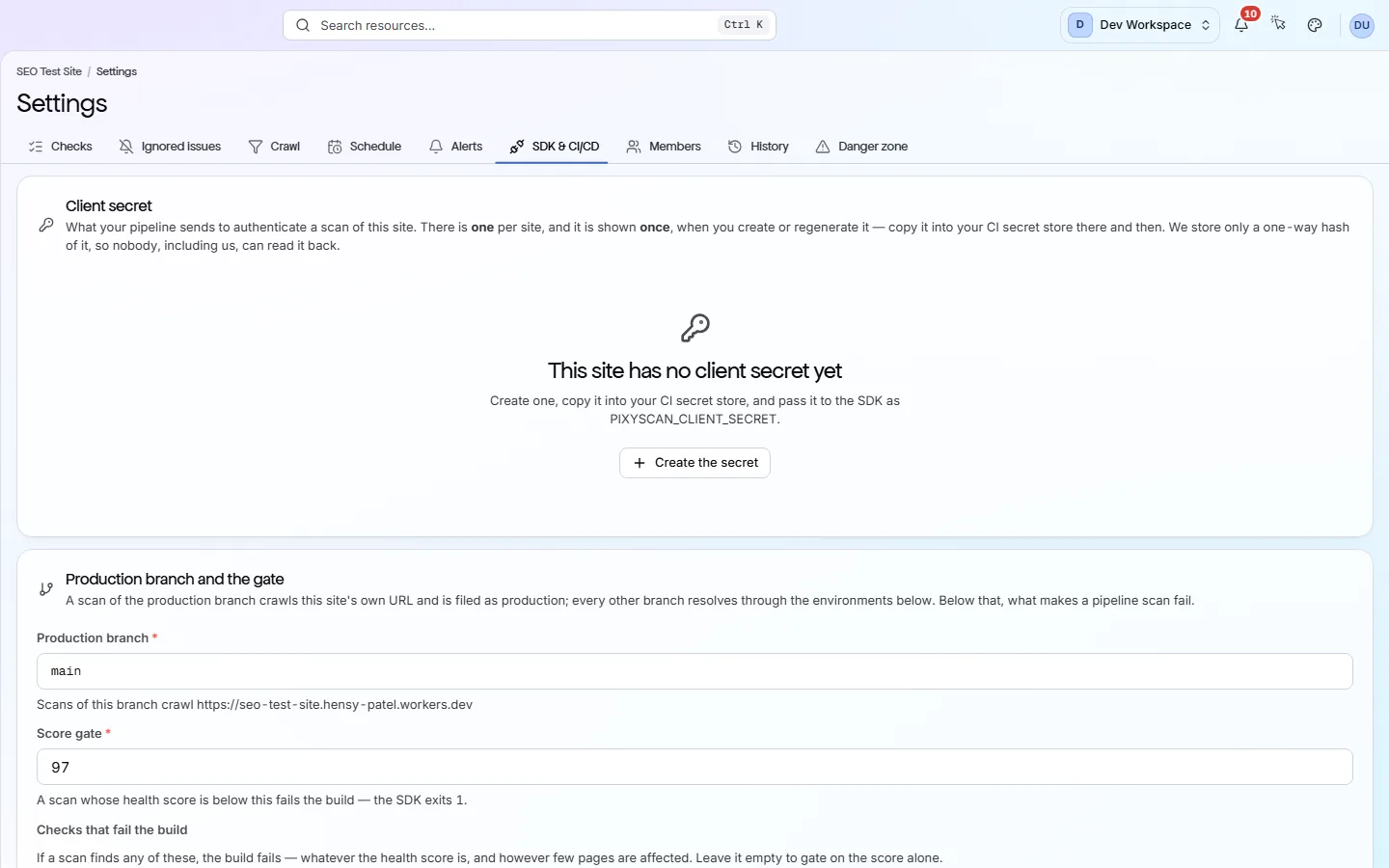
At a glance
What it does and who gets it
- What it does
- Run a PixyScan scan from your build pipeline and stop the release if your score drops.
- Why it helps
- Many site problems arrive with a code change. Catching them in the build keeps them off your live site.
- Included in
- Basic, Pro and Enterprise. Not on Free or Hobby.
What you get
- 01
One command in your pipeline
Add npx pixyscan-sdk run with your site's secret key. PixyScan picks the URL from the branch, runs the scan and prints the score and issues. It waits up to five minutes by default.
- 02
Exit codes your pipeline understands
0 means the scan passed and 1 means it failed. 2 means bad input, such as a branch with no URL set. 3 means PixyScan could not be reached. Codes 2 and 3 are setup problems, not problems on your site.
- 03
You decide what fails the build
Set a minimum score (97 by default), a list of up to 200 checks that must never fail, or both. Keep these rules in the app or in a pixyscan-settings.json file.
- 04
An MCP server for AI assistants
MCP (Model Context Protocol) lets an AI assistant such as Claude read data from other tools. PixyScan's MCP server gives it 9 tools to read your sites, issues and fix guides, and add a new site.
How to use it
4 steps, in the order you do them.
- 1
Create a client secret
In the site's Settings, open the SDK & CI/CD tab and create a client secret. It starts with sk_live_ and is shown once, so save it in your CI's secret store.
- 2
Link branches to addresses
On the same tab, link each branch to the address it deploys to, such as main to your live site. PixyScan scans the address that matches the branch.
- 3
Add one command
Add npx pixyscan-sdk run --client-secret "$PIXYSCAN_SECRET" to your pipeline. It prints the score and exits with code 1 if the scan fails your gate, which stops the build.
- 4
Connect the MCP server (optional)
MCP (Model Context Protocol) lets an AI assistant such as Claude read data from other tools. Add PixyScan's MCP server and sign in through your browser.
Which tiers include it
Basic, Pro and Enterprise. Not on Free or Hobby.
- The command, the CI/CD check and the MCP server all start on Basic.
- On Free and Hobby the SDK & CI/CD tab is visible but locked.
- Scanning a site built with JavaScript needs JavaScript rendering, from Pro up.
- Deploy markers on the search trend and the traffic-drop alert also need Google Search Console connected to the site.
What it doesn’t do
- No GitHub app. Nothing comments on a pull request or blocks a merge by itself.
- The MCP server can read results and add a site, but it cannot start a scan.
- No public REST API yet.
- It does not write fixes or change your code.
Why use it
When it helps
Everyday moments where it saves you time or catches a problem early.
Never ship a broken page
Add “Broken internal links and pages” to your fail-on list. The build fails on even one broken internal link, whatever the score.
Start without breaking every build
The default minimum score is 97, and many sites score lower at first. Set it to today's score, then raise it as you fix things.
Fix site problems from your editor
Ask your AI assistant for your site's problems and fix guides through the MCP server, then fix them in your code.
Where to find it in the app
All eleven screensManage
Settings
Each site has its own settings. They decide which pages are scanned, how often, who gets alerts and who can see the site. Changes apply from your next scan.
Monitor
Changes
The Changes screen compares two scans of your site. It shows which problems are new, which you fixed and which are still open, and what changed on each page. Included from Hobby up.
Questions
Common questions
Short answers about tiers, setup and limits.
Which tiers include CI/CD and MCP?
Basic and above. On Free and Hobby the SDK & CI/CD tab is visible but locked.
What do the exit codes mean?
0 means the scan passed. 1 means it failed your gate. 2 means the input was wrong, such as a branch with no address linked. 3 means PixyScan could not be reached.
Which CI providers does it support?
Any CI that can run npx. The branch is found automatically on GitHub Actions, GitLab CI, CircleCI, Bitbucket Pipelines and Vercel. Elsewhere, pass it with --branch.
Does it record which commit was deployed?
Yes, from version 1.2.0 of the command. It reads the commit on GitHub Actions, GitLab CI, Bitbucket Pipelines, CircleCI, Vercel and Netlify, with a link where the CI gives one, and uses the tag on a tag build as the release. Override it with --commit, --commit-url and --release, or turn it off with --no-commit. It only labels the deploy; the scan and its result do not change.
How long does the step take?
It depends on how many pages the scan covers. The command waits up to five minutes by default.
What goes in pixyscan-settings.json?
It is optional. It can hold minScore, the lowest score the build accepts, and failOnIssues, up to 200 checks that must not fail. Anything left out uses the site's settings in the app.
What can the MCP server do?
It has 9 tools. It can list your workspaces and sites, read problems, affected pages and fix guides, and add a new site. It cannot start a scan.
Other features
All featuresReports and exports
Turn any scan into a report or data file: 61 kinds, in PDF, CSV, XLSX, JSON or Markdown.
ReadWorkspaces, sites and roles
Put your sites and your team in one workspace, and give each person only the sites they need.
ReadScheduled monitoring
PixyScan scans your site daily, weekly or monthly on its own, and tells you what changed.
ReadSee what is wrong with your site
Add your site and get your score, your to-do list and a fix guide for every problem. Free for one site and 500 pages a month. No card, no time limit.
No card needed · Nothing to install · Cancel any time