

User guide3 min
Content
The Content screen shows what each page says to readers and search engines: its title, meta description (the short summary under a search result), headings and amount of text. Click any count to list the pages behind it.
How to get there#
Content is in the Explore group of the site sidebar, right after Pages.
- 1
Open Content in the sidebar
Open the site, then choose Content under Explore. It opens on the Overview tab.
- 2
Read Overview, then open Table
Overview shows how big each problem is. Click any tile or bar to jump to the Table tab, filtered to the pages with that problem.
- 3
Open a page to fix it
Click the URL in a row. The page's report opens on its Content tab, with the full title, description and heading outline.
app.pixyscan.com/w/…/s/…/content
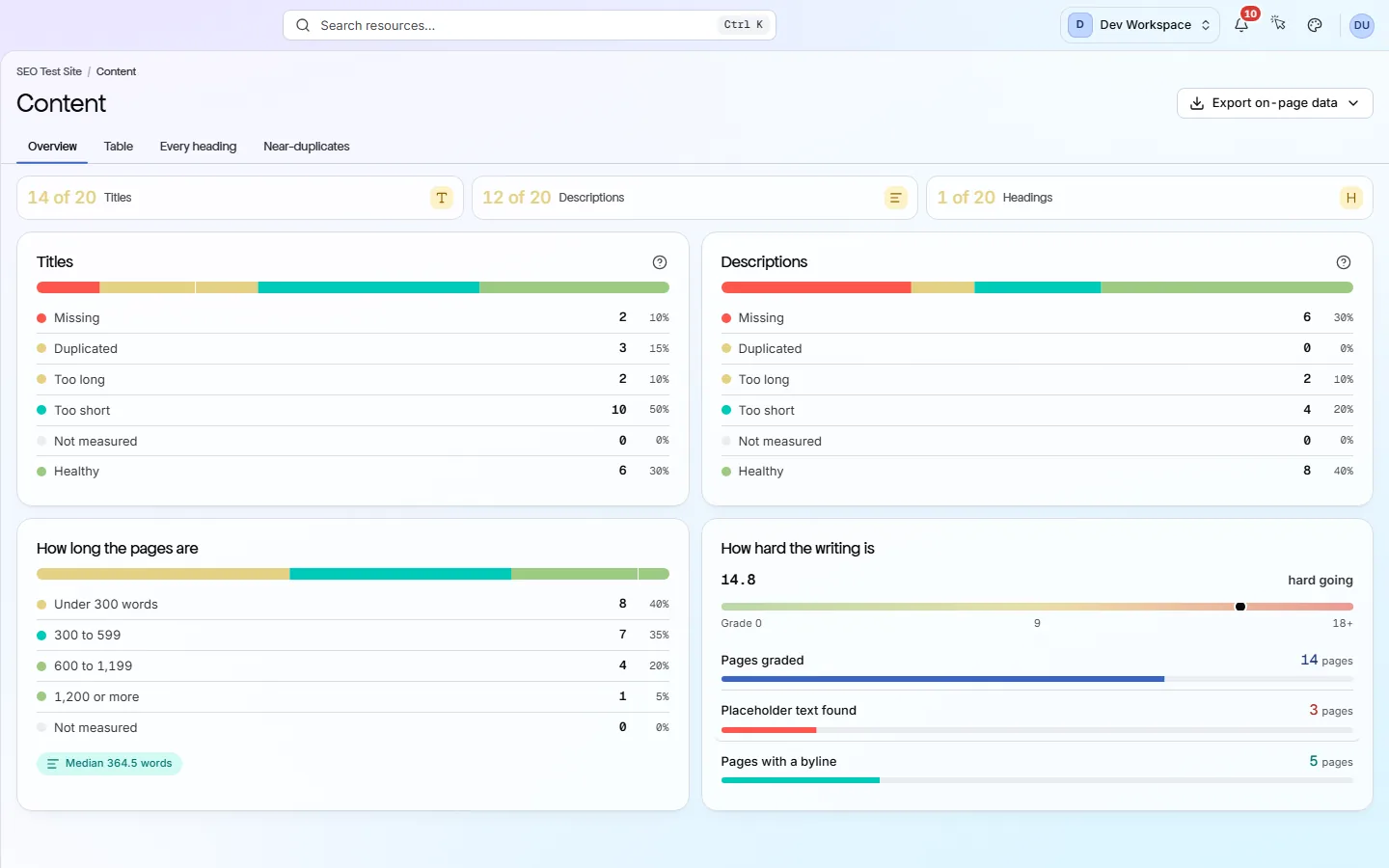
How Explore screens are laid out#
Most Explore screens share this layout. Learn it once and it works everywhere.
Tiles at the top show the headline counts, usually as “X of Y” pages. Cards below split each count into states. Tabs switch between the summary and detailed tables. The tab is saved in the address, so a shared link opens the same view.
Export in the header downloads the data behind the current view as CSV, Excel or JSON. Why does Export ask me to upgrade? Exports need the Hobby tier or above. On Free, the button opens an upgrade prompt instead.
The three tiles#
Each tile counts pages with at least one problem of that kind.
| Field | Counts a page when | What it does |
|---|---|---|
| Titles | Missing, duplicated or off-length | No title, the same title as another page, or a title under 30 or over 60 characters. |
| Descriptions | Missing, duplicated or off-length | The same test for the meta description. A healthy length is 70 to 160 characters. With no description, search engines write their own snippet. |
| Headings | H1 or outline problem | The page does not have exactly one H1 (main heading), or its headings skip a level, such as an H2 followed by an H4. |
The four tabs#
A summary, then three detailed lists.
| Field | Answers | What it does |
|---|---|---|
| Overview | How big is the problem? | The tiles and cards. Start here to see which problem affects the most pages. |
| Table | Which pages? | One row per page: title, description, word count, number of H1s and reading grade. Filters such as Missing title, Duplicate description and Thin content narrow the list. |
| Every heading | Are headings in order? | One row per heading on the site, with its level and position. Use the H1 to H6 filters to spot empty or out-of-order headings. |
| Near-duplicates | Which pages are too alike? | Pairs of pages whose body text is at least 90% the same. Near-identical pages compete with each other in search. Merge them, or make each one different. |
What the cards show#
Four cards break the site down by title, description, length and reading level.
| Field | States | What it does |
|---|---|---|
| Titles | Missing · Duplicated · Too long · Too short · Not measured · Healthy | The bar shows each page once, under its worst problem. Fix Duplicated first: it usually means a template gives many pages the same title. |
| Descriptions | The same six states | The same breakdown for meta descriptions. Not measured means the text exists but its length was not recorded. |
| How long the pages are | Under 300 words · 300 to 599 · 600 to 1,199 · 1,200 or more | Pages grouped by word count in their body text. The Thin content filter lists the pages under 300 words. |
| How hard the writing is | A reading grade | The median Flesch-Kincaid grade, which is roughly the school year a reader needs. It also counts pages graded, pages still carrying placeholder filler text, and pages that name an author. |
Why the numbers can add up to more than the site
Does something here not match what you see in the app? Tell us